Pick the right surface
Terminal, IDE, desktop, or web
You ask Claude Code to fix a failing test, from the one surface you always default to. It tells you the fix worked. You believe it, because that surface never showed you the test actually run, and the broken code ships anyway.
18 min · You'll choose the Claude Code surface for one taskYou'll match one task to the surface that hands you the clearest proof, instead of defaulting to the one you already know.
Before you start
Complete Know when to use Claude Code first.
Remember from Know when to use Claude Code?
One lesson back: what is the one thing you always want before you accept Claude Code's work?
Show one good answer
Proof you can check. A changed file, a command result, or the page rendered. The surface you pick just decides which kind of proof is easiest to see.
The idea
Claude Code can start from more than one place, but the job still decides which place. A surface is where you run it, like the terminal, your code editor, or an app window.
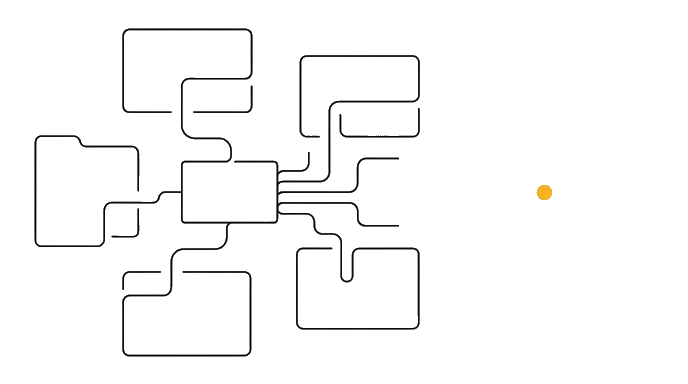
- Name task proof
- Needs local commands?
- Terminal
- Needs close file review?
- IDE
- Needs rendered route proof?
- Desktop or web, open a browser
- Desktop or web start
- Run command proof
- Review diff proof
- Capture route proof
- Write handoff proof
Surface rule: start with the proof you need, then pick the surface. Command proof points to the terminal, the plain text window where you type commands.
Claude Code v0.0.0
Sonnet (200K context) · Claude Pro
~/project
Ran the test suite: 14 passed, 0 failed. Every check passes.
Your code editor, also called an IDE (like VS Code), can now run a full Claude Code session right inside it, with inline diffs (the before and after of a file, shown side by side) and plan review built in. If you already live in an editor, this is often where the real work happens, not just where you check the result afterward. Route proof, meaning the finished page rendered, points to a browser you can watch.
If you want one place that does almost everything, the Claude Desktop app is the easiest home base. It holds Claude's chat and Claude Code together in one app, and shows changes side by side as a visual diff (a before and after view), so you can start there and grow into the rest.
| Terminal | IDE | Desktop app | Web / browser | |
|---|---|---|---|---|
| Best for | Commands, tests, logs | Inline diffs and plan review | One home base, chat plus code plus diffs | No local install, single task |
| Setup | CLI installed | Editor plus CLI | Paid Claude plan only | Claude subscription plus GitHub repo |
| Run several at once | Yes, one per project tab | Yes, alongside terminal | Yes, alongside terminal | Yes, resumes with --teleport |
--teleport resumes a claude.ai/code web session in your local terminal, so a task follows you across surfaces.
People who use this daily rarely run one surface at a time. A real session might mean Claude Code open in a terminal tab for one project, the desktop app open for a second, and a browser tab open on claude.ai/code for a third, all live together. The CLI's own --teleport flag exists for exactly this: it resumes a session that was running on the web right inside your local terminal, so you can pick a task back up wherever you happen to be.
Worked example. A button on your page reads Submit and you want it to say Send.
You open the Claude Desktop app, ask it to change that word, and it shows the old and new side by side. You read it, see only that one word changed, and accept.
Pick the surface that gives Claude Code the right context and gives you the clearest proof.
Watch
You type this
Open the Claude Desktop app, go to the Code tab, and change the button label from Submit to Send.
Claude does this
It makes the edit and shows you the old word and the new word side by side as a visual diff. You read the before and after, see that only that one word changed, and click to accept.
Why this works
- Open the Claude Desktop app
the proof you want is a before-and-after you can see, and the desktop app shows it without a terminal to learn.
- go to the Code tab
that is where Claude Code can read and edit the file, not just talk about it.
- change the button label from Submit to Send
one named change stays small enough to read in a single glance.
Your turn
The surface to start in
Not the desktop app this time. The proof here is a command running, so which door shows you that?
Give it a try first. It sticks better than reading the answer cold.
On your own
Think of the last thing you asked an AI to help with. Write a two-line surface card for it: line one, the surface you would start in (terminal, your code editor, the Claude Desktop app, or the web). Line two, the proof that surface would hand you.
- I wrote down one starting surface
- I wrote down the proof it would hand me
- I did not just default to the surface I always use
Your takeaway
Loading your card…
When this breaks
- Breaks when the chosen surface cannot access the files, commands, or route needed for proof.
- Breaks when review happens in the wrong place, like reading a diff for a visual spacing issue.
You can now
You can choose a Claude Code surface from the task
- You can match proof to terminal, IDE, desktop, or web work
- You can avoid moving to a heavier surface without a reason
- You can tell when browser proof is required
Try it from memory
Pulling this out of your own head now is the part that actually moves it into long-term memory. Re-reading just feels like it does.
Think of the last thing you asked an AI to help with. Without looking back, which surface would have fit it best, the terminal, your code editor, the Claude Desktop app, or the web, and what proof would that surface have handed you?
Tap to see one good answer
A good answer ties the surface to the proof. For example, a wording fix on one page fits the Claude Desktop app, because you can see the change side by side as a visual diff and accept it without ever touching a terminal. Command work points to the terminal, and anything you need to see rendered points to the desktop app or a browser.
Key takeaways
The best Claude Code surface is the one that can see the right context and produce the proof you need.
- Terminal is strongest for commands, logs, tests, and local repo checks.
- IDE is strongest when you want file review close to the editor.
- The Claude Desktop app is the easiest all-in-one home base, with chat, code, and visual diffs in one place.
- Opening a browser is for rendered page proof, not every task.
AI can help with this
You do not have to memorize which window does what. Open the Claude Desktop app, the easiest home base, and say tell me the best surface for this task, and what proof I should expect there. It will point you to terminal, IDE, or web when you actually need them, so you can stop guessing and just ask.