Read vs read and write: understanding what each Connector can do
The permission that decides what Claude can do on its own
After this, you'll be able to identify whether a Connector is read-only or read-and-write, predict what Claude can and cannot do as a result, and decide which permission level you actually want for a given task.
Before you start
Complete The Connector directory first; you learned to read a Connector's action list there, and this lesson turns that list into the read-versus-write decision that controls what Claude can do on its own.
The idea
Read-only versus read-and-write is the line between Claude advising you and Claude acting for you. A read-only Connector can look at the data and tell you about it; a read-and-write one can post a message, update a record, or create an event.
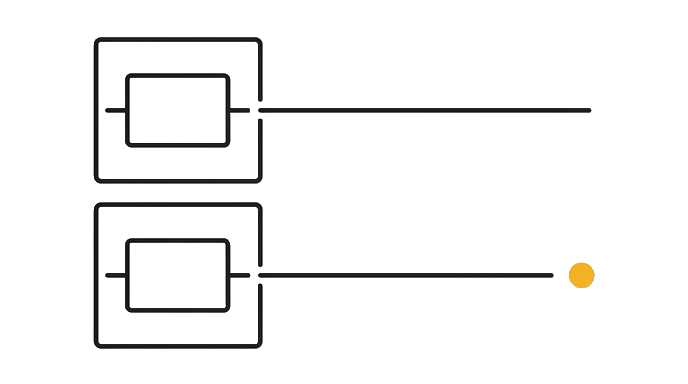
The difference is not cosmetic. Read-only means Claude reports; read-and-write means Claude changes something in a real system.
The safe habit is to default to read-only and add write access only for a specific task where you have decided you want Claude to act.
Here is the before and after: Before, you assume connected means Claude can do everything, tell it to "update the deal stage in my CRM," and nothing happens because that connector only lists read actions. After, you check the action list first, see no write action, and rewrite the task as "draft the CRM update for me to apply," so your expectation matches reality.
Now try it pick one Connector you have, confirm from its action list whether it is read-only or read-and-write, then write one task it CAN do today and one it CANNOT.
Read-only means Claude advises; read-and-write means Claude acts. Default to read-only until acting is the point.
Try it (12 min)
Watch out for
- Assuming connected means Claude can act. Read-only Connectors advise only; they change nothing.
- Granting write access broadly 'just in case.' Add it per task where acting is the actual goal.
- Missing a silent failure. A read-only Connector asked to write may report progress on a step it cannot take.
- Confusing 'Claude drafted it' with 'Claude sent it.' A draft in chat is not an action in the tool.
- Forgetting that write actions are real. A posted message or updated record affects other people immediately.
Paste this into Claude
Help me reason clearly about read-only versus read-and-write access for a Connector I have.

The Connector: [e.g. my Slack / my CRM / my calendar].
What it lists as supported actions: [paste the actions, e.g. "read messages only" or "read and send messages"].

Walk me through this:
1. Tell me whether this Connector is read-only or read-and-write, based on the actions I listed
2. Give me two useful tasks Claude can do today with this exact permission level
3. Give me one task people often want that this permission level CANNOT do, and rewrite it as something Claude CAN do instead (for example, turn "send the email" into "draft the email for me to send")
4. Tell me one task where I should deliberately NOT want write access, even if it were available, and why

Be concrete and explain any term in the sentence it appears.
What good looks like
- Claude correctly classified the Connector as read-only or read-and-write from the listed actions
- Both 'can do' tasks are achievable with the stated permission level
- Claude rewrote an out-of-reach task into a version the permission level supports
- Claude named a real case where you would choose to withhold write access on purpose
- You can state your Connector's permission level and one task it cannot do
When this breaks
- Breaks when a task assumes write access it does not have, because the read-only Connector cannot complete the action, and the step quietly produces nothing instead of an error you would notice.
- Breaks when write access is granted too broadly, because Claude can then take real actions you did not specifically intend, and a wrong action in a live system is harder to undo than a wrong draft in chat.
AI can help with this
Copy your Connector's listed actions, then paste: 'Tell me if this is read-only or read-and-write, give me two tasks it can do, one it cannot (rewritten into a draft-for-me version), and one task where I should withhold write access on purpose and why.'
You can now
You can complete the lesson outcome in a real Claude chat, Project, Artifact, Connector, Desktop, or Code surface.
- You can verify that claude correctly classified the Connector as read-only or read-and-write from the listed actions.
- You can verify that both 'can do' tasks are achievable with the stated permission level.
- You can verify that claude rewrote an out-of-reach task into a version the permission level supports.
- You can verify that claude named a real case where you would choose to withhold write access on purpose.
Key takeaways
Read-only means Claude advises; read-and-write means Claude acts in the connected tool. Match the permission to the task and default to read-only until taking a real action is the point.
- Classify every Connector as read-only or read-and-write before you design a task around it.
- Default to read-only and add write access only for a specific task where acting is the goal.
- Rewrite out-of-reach tasks into draft-for-me versions when a Connector cannot write.
- Watch for silent failures where a read-only Connector reports progress on an action it cannot take.
- Treat write actions as real and immediate, since a posted message or updated record affects others at once.
Go deeper